





































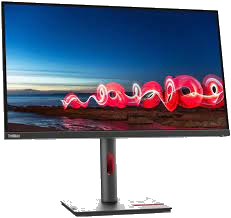
Lenovo ThinkVision T27i-30
Lenovo ThinkVision T27i-30 Features
- The ThinkVision T27i-30 Monitor is carefully set up with features that make it easier to connect, boost your output, and keep you comfortable.
- This big 27-inch FHD monitor has a resolution of 1920 x 1080 pixels and a wide viewing angle, so everything on the screen is clear and sharp.
- With 99% sRGB, you can expect bright, rich colours. This makes the screen clearer and works well for video makers and film designers.
- Eye strain can happen after staring at a screen for a long time, but not with the ThinkVision T27i-30 Monitor.
- Its Natural Low Blue Light technology blocks out dangerous blue light so your eyes are comfy and won’t hurt.
- The monitor has a USB Hub, VGA, HDMI 1.4, and DP 1.2 ports, so it can be used for a wide range of tasks. With this monitor’s expandable features, you can say hello to great videoconferencing1 features.
- Delivered across the Kingdom
- Genuine, from an authorised distributor
- Cards, bank transfer or cash on delivery
- Ask for a project or bulk price
Lenovo ThinkVision T27i-30 Description
Lenovo ThinkVision T27i-30 – LED monitor – 27″ – 1920 x 1080 Full HD (1080p) @ 60 Hz – IPS – 300 cd/m² – 1000:1 – 4 ms – HDMI, VGA, DisplayPort – black, VGA +HDMI/3Y 63A4MAT1UK
Check all Lenovo Computers from this URL
Specification
| Item code | SP8347721964 |
|---|---|
| Brand | Lenovo |
| Category | Computing, Screens |
| Availability | Available to order |
| Display Type | LED-backlit LCD monitor / TFT active matrix |
| Diagonal Size | 27″ |
| Built-in Devices | USB 3.2 Gen 1 hub |
| Panel Type | IPS |
| Aspect Ratio | 16:9 |
| Native Resolution | Full HD (1080p) 1920 x 1080 at 60 Hz |
| Pixel Pitch | 0.3114 mm |
| Pixel Per Inch | 82 |
| Brightness | 300 cd/m² |
| Contrast Ratio | 1000:1 / 3000000:1 (dynamic) |
| Colour Support | 16.7 million colours |
| Colour Gamut | 99% sRGB (CIE 1931) |
| Response Time | 4 ms (extreme), 6 ms (typical) |
| Horizontal Viewing Angle | 178 |
| Vertical Viewing Angle | 178 |
| Screen Coating | Anti-glare |
| Backlight Technology | WLED |
| Features | Borderless |
| Colour | Black |
| Dimensions (WxDxH) | 61.19 cm x 20.45 cm x 54.43 cm – with stand (highest position) |
| Weight | 6.9 kg |
| Connectivity | |
|---|---|
| Interfaces | HDMI ¦ VGA (HD-15) ¦ DisplayPort ¦ 4 x USB 3.2 Gen 1 downstream ¦ USB 3.2 Gen 1 upstream |
| Mechanical | |
|---|---|
| Display Position Adjustments | Height, pivot (rotation), swivel, tilt |
| Tilt Angle | -5/+23.5 |
| Swivel Angle | 90 |
| Rotation Angle | 180 |
| Height Adjustment | 155 mm |
| VESA Mounting Interface | 100 x 100 mm |
| Miscellaneous | |
|---|---|
| Features | Security lock slot (cable lock sold separately), integrated cable management |
| Cables Included | 1 x DisplayPort cable – 1.8 m ¦ 1 x USB-A to USB-B cable – 1.8 m |
| Compliant Standards | CCC, RoHS, China Energy standard Tier 2, TUV Rheinland Eye Comfort Certification, TUV Eyesafe Display Certification, TUV Rheinland Low Blue Light (Hardware Solution) |
| Localisation | English / United Kingdom |
| Security Slot Type | Kensington security slot |
| Power | |
|---|---|
| Input Voltage | AC 100-240 V (50/60 Hz) |
| Power Consumption (Typical) | 24 Watt |
| Power Consumption (Max) | 65 Watt |
| Power Consumption Sleep | 0.5 Watt |
| Power Consumption (Off Mode) | 0.3 Watt |
| Software / System Requirements | |
|---|---|
| Included Software | Lenovo ThinkColour |
| OS Required | Windows 10, Windows 11 |
| Dimensions & Weight | |
|---|---|
| Dimensions & Weight Details | With stand (highest position) – width: 61.19 cm – depth: 20.45 cm – height: 54.43 cm – weight: 6.9 kg ¦ With stand (lowest position) – width: 61.19 cm – depth: 20.45 cm – height: 38.93 cm – weight: 6.9 kg ¦ Without stand – width: 61.19 cm – depth: 5 cm – height: 36.25 cm – weight: 4.9 kg |
| Dimensions & Weight (Shipping) | |
|---|---|
| Shipping Width | 69 cm |
| Shipping Depth | 52.5 cm |
| Shipping Height | 14.8 cm |
| Shipping Weight | 10.1 kg |
| Sustainability Information | |
|---|---|
| TCO Certified | TCO Certified Edge Displays, TCO Certified Displays 9 |
| EPEAT Compliant | EPEAT Gold |
| ENERGY STAR Certified | Yes |
| Manufacturer Warranty | |
|---|---|
| Service & Support | Limited warranty – 3 years |
Brand
Lenovo
Fifty-three Lenovo lines in four groups, and the catalogue leans to notebooks rather than desktops. Business notebooks: ThinkPad X13 Gen 3, L14, L15, E14, E15 and E16, and ThinkBook 14 and 15, mostly on 12th and 13th generation Intel Core i5 and i7 with AMD Ryzen options. Consumer and gaming notebooks: IdeaPad 1, 3 and 5, IdeaPad Gaming 3, Legion 5 Pro, Yoga Slim 7 Pro X and the Yoga 9 2-in-1. Desktops and all-in-ones: ThinkCentre neo 50t tower, ThinkCentre neo 30a and V30a all-in-ones, and IdeaCentre AIO 3. Monitors: ThinkVision T27i-30, S22e, L27e-30 and D-series, and Legion and G-series gaming monitors from 24.5 to 32 inches, flat and curved. There is also a Lenovo Tab P11 tablet.
The line decides more than the spec sheet does. ThinkPad and ThinkCentre are the business tiers — docking, manageability and multi-year parts support are what the premium buys. IdeaPad and IdeaCentre are the consumer tiers, often on the same processors with a different service story. Legion is built for sustained load and cooling, which is why it suits CAD and rendering as much as gaming. On monitors, refresh rate is a gaming number while panel type and resolution are the office ones.
Saudi Supplier supplies companies, IT departments and resellers across Saudi Arabia. Configuration and quantity change pricing, so it is quoted rather than listed. Send the model or the specification you need and request a quote — availability and lead time come back with it.

Request a quote for the set
Tick what you need and send one request for all of it.
Related products
-
Computing, Laptops
Apple iPadPro 12.9-inch(Wi-Fi + Cellular, 512GB)Space Gray

Apple iPadPro 12.9-inch Features
- Amazing iPad 12.9-inch Liquid Retina XDR display powered by the P3 wide color M2 processor, which features an 8-core CPU and a 10-core GPU.
LiDAR Scanner, 12MP Wide camera, and 10MP Ultra Wide rear camera for immersive AR - Front-facing 12MP ultra-wide camera with center stage
- Extremely rapid Wi-Fi 6E and 5G cellular
- MP223AB/A
SKU: SP4256521741AppleRequest a Quote - Amazing iPad 12.9-inch Liquid Retina XDR display powered by the P3 wide color M2 processor, which features an 8-core CPU and a 10-core GPU.
-
Computing, Desktops
Dell OptiPlex 3000 Tower, Intel Core i5-12500, 4GB
Dell OptiPlex 3000 Tower Features
- Dell OptiPlex 3000 Tower PCs and accessories come in new designs make them easy to integrate into any modern workplace.
- Up to 60% of the materials are recovered after they have been used, which is good for the earth.
- The internal frame and surround design lets more air flow through, which makes cooling work better.
- Memory with more power Up to 64 GB of DDR4 memory lets you do more and switch between tasks.
- Impressive visuals of 12th Gen Intel® integrated graphics, along with optional NVIDIA and AMD discrete graphics cards.
- An optional DisplayPort enables the use of displays with a maximum resolution of 8K, for enhanced colors grading and motion stabilization when using visual effects.
- The future-proofing Wi-Fi 6E standard provides enhanced performance and increased bandwidth.
SKU: SP8498621765DellRequest a Quote -
Computing, Desktops
HP Pro Tower 290 G9 i7-12700 12th Generation 8GB / 256 SSD
HP Pro Tower 290 G9 i7 Features
- Superior RAM and Storage Capabilities: Boost multitasking with 16GB RAM and experience substantially quicker performance than with conventional hard drives thanks to a 1TB PCIe M.2 SSD.
- CPU: 12th Generation Intel Core i3-12100 (with Intel Turbo Boost Technology, maximum speed of 4.3 GHz, 12 MB L3 cache, four cores, and eight threads)
- “Graphics and DVD” A compact drive featuring an emergency eject perforation and an integrated Intel UHD 730 graphics card are both components of the system, enabling users to read and write to CDs and DVDs.
- “Portability and Connectivity” The system provides connectivity via a combination of Wi-Fi 6 and Bluetooth, in addition to an extensive selection of interfaces including HDMI, VGA, RJ-45, and 8 USB terminals (4 USB 2.0 and 4 USB 3.2 Gen 1).
- “Operating procedure” Enhance your computing experience with the 64-bit version of Windows 11 Pro, which features a streamlined user interface and US English language support. Additionally, a Black HP 125 wired USB Keyboard with an English (UK) layout and a Black HP 125 wired USB Mouse are included in the bundle. Boost your computing experience with the assistance of this extensive assortment of accessories.
SKU: SP4346121784HPRequest a Quote -
Computing, Laptops
Apple iPad 10.2-Inch, 64GB, WiFi, Silver MK2L3AB/A
Apple iPad 10.2-Inch Features
- Display: IPS LCD with 10.2 Inches and 1620 x 2160 Pixels
- Processor: Hexa-core (2×2.65 GHz Lightning + 4×1.8 GHz Thunder)
- Main Camera: –HDR, panorama, -8 MP, f/2.4, 31mm (standard)
- Connectivity: Bluetooth (4.2, A2DP, EDR, LE)Wi-Fi (dual-band, hotspot)
- Memory: 64GB Internal memory, 3GB RAM
- Model Number: MK2L3AB-A
- Battery: Non removable Li-Ion with 8557 mAh (32.4 Watt)
SKU: SP5689721737AppleRequest a Quote